Two ways to send WhatsApp from a CRM
The WhatsApp Business Platform (Cloud API) lets software send messages itself. It needs a Meta business account, pre-approved message templates for anything outside a customer-initiated conversation, and it's paid per message. It's the right tool for automated reminders at scale.
Click-to-chat links (wa.me) open WhatsApp on the rep's phone or computer, with a chat to the customer and a message already typed. The rep reads it, adjusts it if they like, and presses send. There's no account to set up and nothing to pay, because WhatsApp does the sending from the rep's own number.
How Call Manager uses click-to-chat
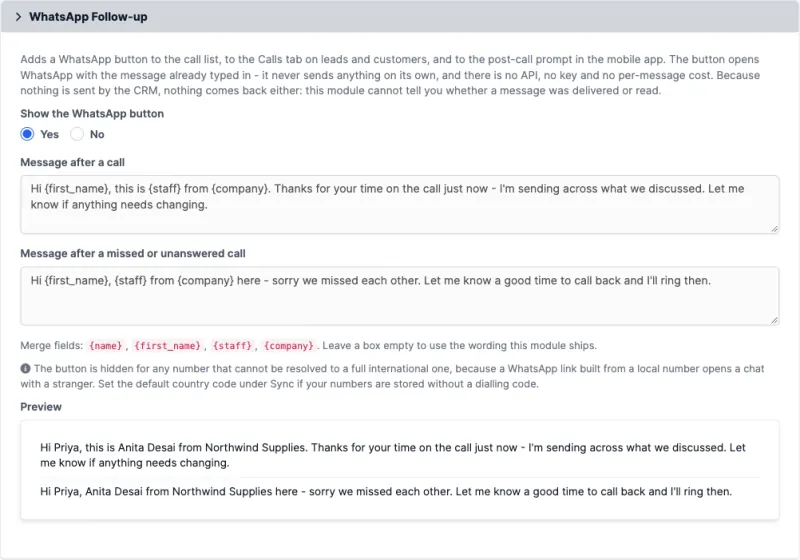
A WhatsApp button sits on the call list, on the Calls tab of every lead and customer, and on the post-call prompt on the rep's phone. It fills one of two templates you write:
- After a conversation, for example to send what was promised.
- After a call where nobody spoke, meaning a missed call, a call that rang out or one rejected on the move. This is the "sorry we missed each other" message, offered automatically.
Templates can include {name}, {first_name}, {staff} and {company}. The preview shows the real wording as you type, and the app gets the same templates, so a customer is greeted the same way whichever end the rep uses.
What it can't do, by design
- It isn't automated. The rep presses send. That's why it costs nothing and needs no approval.
- Nothing comes back. Because the CRM doesn't send the message, it can't know whether it was delivered or read.
- It needs a full international number. A
wa.melink built from a local number can open a chat with a stranger, so Call Manager draws no button unless it can resolve the number fully, using your default country code.
Ten templates to adapt
- Hi {first_name}, thanks for your time just now. As promised, here are the details we discussed. {staff}, {company}
- Hi {first_name}, sorry we missed each other. When's a good time to call you back? {staff}
- Hi {first_name}, following up on our call. Shall I book the demo for Thursday morning?
- Hi {first_name}, here's the quote we discussed. Happy to walk you through it on a call.
- Hi {first_name}, I tried calling about your enquiry. Reply here whenever suits you. {staff}, {company}
- Hi {first_name}, your site visit is confirmed. I'll share the location shortly.
- Hi {first_name}, just checking you received the documents. Any questions, reply here.
- Hi {first_name}, the offer we discussed is open until Friday. Would you like me to reserve it?
- Hi {first_name}, thank you for your order. I'll call you when it's dispatched.
- Hi {first_name}, it's been a while. Anything we can help with this month? {staff}, {company}
Keep messages to people who've agreed to hear from you, and follow WhatsApp's own business policies. The best follow-ups are short, personal and reference the call.