Perfex CRM is excellent at leads, proposals, invoices and projects. What it doesn't record is the thing many sales teams spend most of their day doing: talking on the phone. A rep can add a note after a call, but in practice most calls leave no trace. Nobody knows who was called, how long they spoke or what was agreed.
The four ways to get calls into Perfex
1. Log calls by hand
Reps type a note or activity after every call. It costs nothing, but it depends entirely on discipline. On a busy day the calls that get logged are the ones that went well, which is the opposite of what a manager needs to see.
2. A browser or VoIP dialer
Modules built on services like Twilio put a dial pad in the browser. Calls made through it are logged and recorded automatically. The catch is that only calls made through the dialer are captured, reps need a headset and a new number, and you pay per minute for every call.
3. Cloud telephony or a SaaS call tracker
Virtual numbers route calls through the provider's network, which records and logs everything. It's the most complete option and the most expensive: usually a monthly fee per user plus call minutes, with the data held in the provider's cloud and a connector to bring it into Perfex.
4. Sync the call log from reps' own phones
An app on each rep's Android phone reads the phone's own call log and sends it to the CRM. Reps keep their phones, numbers and habits. Every call on the synced SIM is captured, including incoming calls to the rep's usual number, and there are no per-minute or per-seat fees. Recordings arrive where the phone's own dialer makes them, which is most Samsung, Xiaomi, vivo, OPPO and realme phones, but not Pixel, Motorola or OnePlus.
Choosing between them
| Captures | Cost | Best for | |
|---|---|---|---|
| Manual | What reps remember | Reps' time | Very small teams |
| VoIP dialer | Calls dialled through it | Per minute | Desk-based outbound teams |
| Cloud telephony | Calls on its numbers | Per user, per month | Call centres, strict compliance |
| Call-log sync | Every call on the phone | One-time | Reps selling from their own mobiles |
If your team sells from their own Android phones, and customers ring them back on those numbers, call-log sync captures the most for the least. If you need a recording of every call for a regulator, or your team is on iPhones, a telephony system is the better fit. Our comparison goes into more detail.
Setting up call-log sync with Call Manager
- Install the module. In Perfex, open Setup → Modules, upload
call_manager.zip, then install and activate it. No core files are changed. - Set your default country code under Setup → Settings → Call Manager → Sync. It turns locally dialled numbers into full international ones, which matching and WhatsApp links both rely on.
- Write your call outcomes: the words, colours and points reps will pick from, such as Interested, Follow up, Not interested and Wrong number.
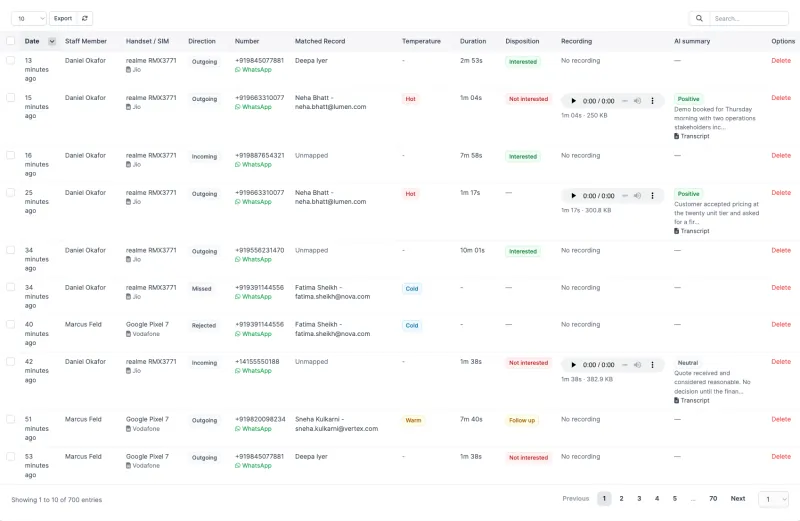
- Pair each phone. Give reps the APK. Each rep opens Pair a device in their own CRM login and scans the QR code. The app shows its consent screen and asks for call-log access.
- Turn on the phone's recorder in its own dialer settings, where the phone supports it, and allow the app storage access. The Diagnostics screen confirms each step.
- Switch on the extras you want: the caller card, the post-call prompt, WhatsApp templates, daily targets and AI summaries.
What to look at in week one
- Matching quality. How many calls found their lead or customer. If many didn't, check the country code and the phone numbers on your records.
- The unmapped queue. Numbers your team has spoken to that aren't in the CRM yet, ranked by talk time. The top of this list is usually new business.
- Missed and not returned. Missed calls nobody has called back. This one's a to-do list.
- Lead response time. How long new leads wait for their first call. See our guide on bringing it down.
Want to see this on a live install first? Book a 20-minute demo, or check your team's phones.