The rule no app can break
Android's call-audio sources are protected by a permission called CAPTURE_AUDIO_OUTPUT. Android grants it only to apps signed with the phone maker's own platform key, or installed on the system partition. It's an operating-system rule, not a Play Store policy, so installing an app outside the Play Store doesn't get round it.
Older recorder apps used workarounds, such as recording through the microphone or the accessibility service. Android 9 and 10 closed most of them, and Google Play's 2022 policy change ended the accessibility trick. Any app that says it records calls on every Android phone today is overpromising.
What the phone's own dialer does
The phone maker's dialer is a system app, so it can record calls, where the maker has built that in and local law allows it. The question for a CRM is what happens to the file afterwards.
- Shared storage. Samsung, Xiaomi, vivo, OPPO and realme dialers save recordings to a folder other apps may read, with the storage permission. An app like Call Manager can find the file, match it to its call by time and length, and upload it.
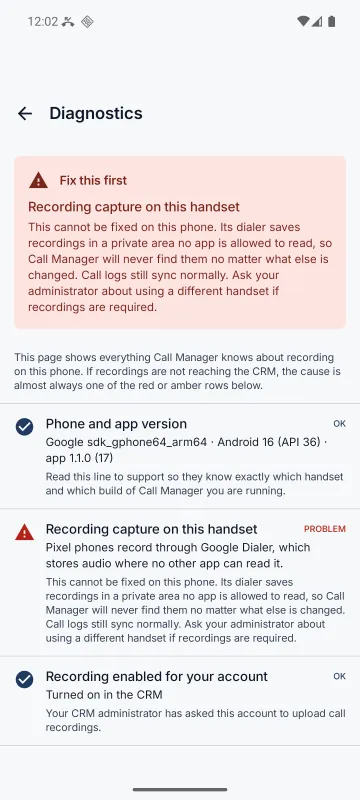
- Private storage. Google's Phone app, used on Pixel and most Motorola phones, keeps recordings inside its own private storage. No other app is allowed to read them, whatever permission it has.
- Closed folders. OnePlus writes recordings under
Android/data, which Android 11 closed to other apps.
Brand by brand
| Phone | Call-log sync | Recording capture | Why |
|---|---|---|---|
| Samsung (One UI) | Yes | Yes | Samsung's Phone app writes recordings to shared storage. |
| Xiaomi, Redmi, POCO (MIUI / HyperOS) | Yes | Yes | Xiaomi's dialer records to shared storage. |
| vivo, iQOO (Funtouch OS / OriginOS) | Yes | Yes | vivo's dialer records to shared storage. |
| OPPO (ColorOS) | Yes | Yes | OPPO's dialer records to shared storage. |
| realme (realme UI) | Yes | Yes | ColorOS underneath, so it behaves like OPPO. |
| Google Pixel | Yes | Never | Google Dialer keeps recordings in its private storage, which no other app may read. |
| Motorola (most models) | Yes | Never | Ships Google Dialer, so the same private storage applies. |
| OnePlus (OxygenOS) | Yes | Never | Writes recordings under Android/data, which Android 11 closed to other apps. |
| Another Android brand | Yes | Test it | Works if that phone's dialer records to shared storage. |
| iPhone | No | No | iOS gives apps no access to the call history at all. |
Call-log sync, meaning the number, direction, time, duration and SIM, works on all of them apart from iPhone. That's usually the part a sales manager needs most.
What to expect across a team
On a typical mixed Android fleet, plan for roughly 35–45% of calls arriving with audio. About 70% of phones are technically capable. But the recorder ships switched off on most of them, some reps won't grant storage access, and some phones delete recordings before they're uploaded. That's an engineering estimate, not a measurement. The reliable way to know is to test one phone of each model your team carries.
If you need a recording of every call, for compliance or dispute resolution, use a telephony system that records in the network instead. Many teams find call logs plus recordings where available are plenty.
A setup checklist for recordings
- Turn on automatic call recording in the phone's own dialer settings, if the model and region offer it.
- Allow the app storage access. On newer Android versions this is "All files access".
- Exempt the app from battery optimisation and allow autostart, especially on Xiaomi, vivo, OPPO and realme.
- Make a test call, then open the app's Diagnostics screen. It checks every link in the chain and names the one to fix first.
Try the phone checker and fleet estimator to see what your team's phones will send.